
Accessible UI Component Redesigns
Many accessibility barriers occur at the component level. Elements such as buttons, form inputs, media controls, and navigation patterns are often designed without considering keyboard users, screen readers, or people with cognitive and motor impairments.
This portfolio showcases a selection of accessible UI component redesigns, demonstrating how common interface patterns can be improved to meet WCAG 2.2 standards and support inclusive digital experiences.
Each project explores how small design changes can significantly improve usability, accessibility, and interaction for a wider range of users.
Design Approach
Each redesign focuses on applying the principles of accessible design:
Perceivable – clear visual hierarchy and readable controls
Operable – keyboard accessible interaction patterns
Understandable – simple, predictable interface behaviour
Robust – compatible with assistive technologies
Purpose
These redesigns demonstrate how accessible design can be applied at a component level, helping organisations create digital products that are more usable and inclusive for everyone.
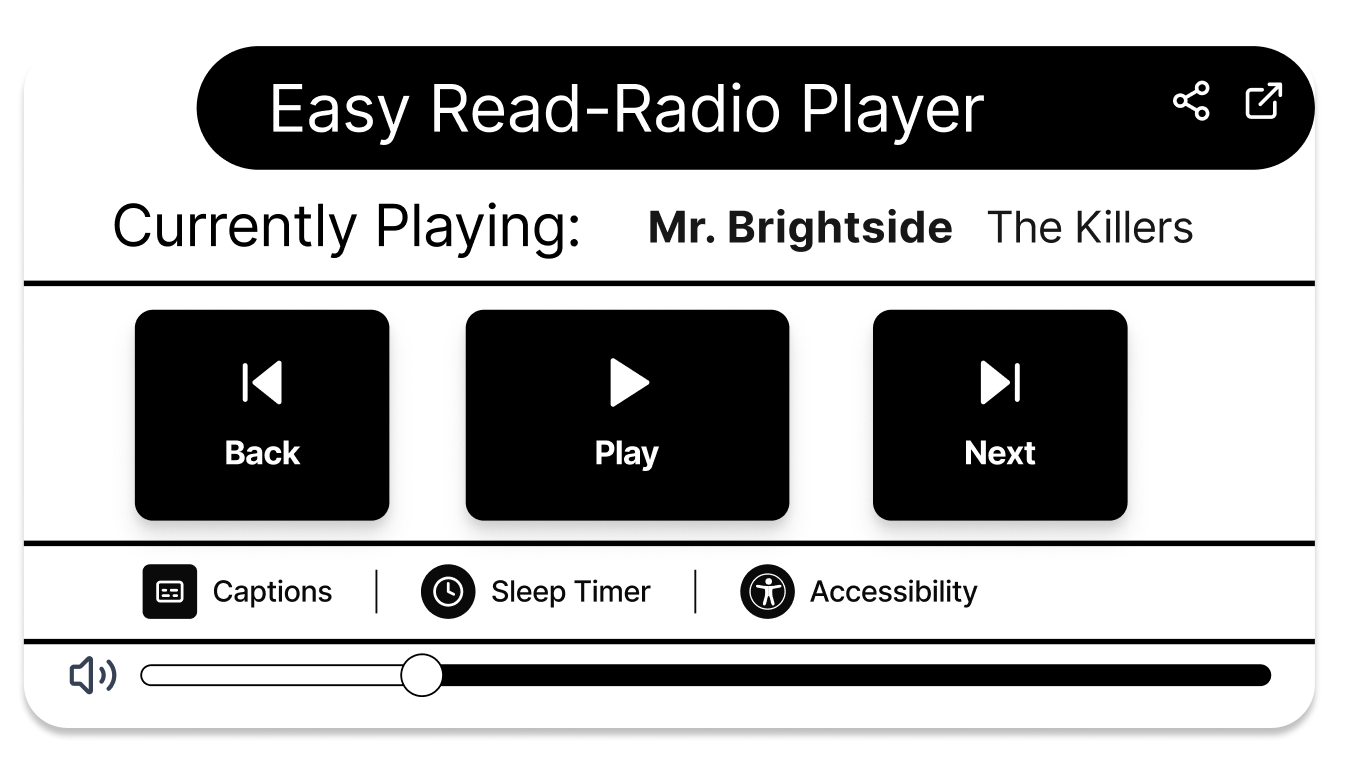
Accessible Radio Player UI
This project explores how a radio player interface can be redesigned to support more inclusive and accessible listening experiences. The player focuses on clear playback controls, keyboard navigation, readable visual hierarchy, and compatibility with assistive technologies such as screen readers. By improving control size, labelling, and interaction states, the design aims to remove common accessibility barriers and create a radio player that is easier to use for a wider range of users.