My Story
Accessibility & Inclusive Design Specialist
Supporting organisations and agencies to reduce accessibility risk and improve usability through structured WCAG 2.2 AA audits, inclusive design advisory, and compliant, accessible solutions.

How I actually test your website
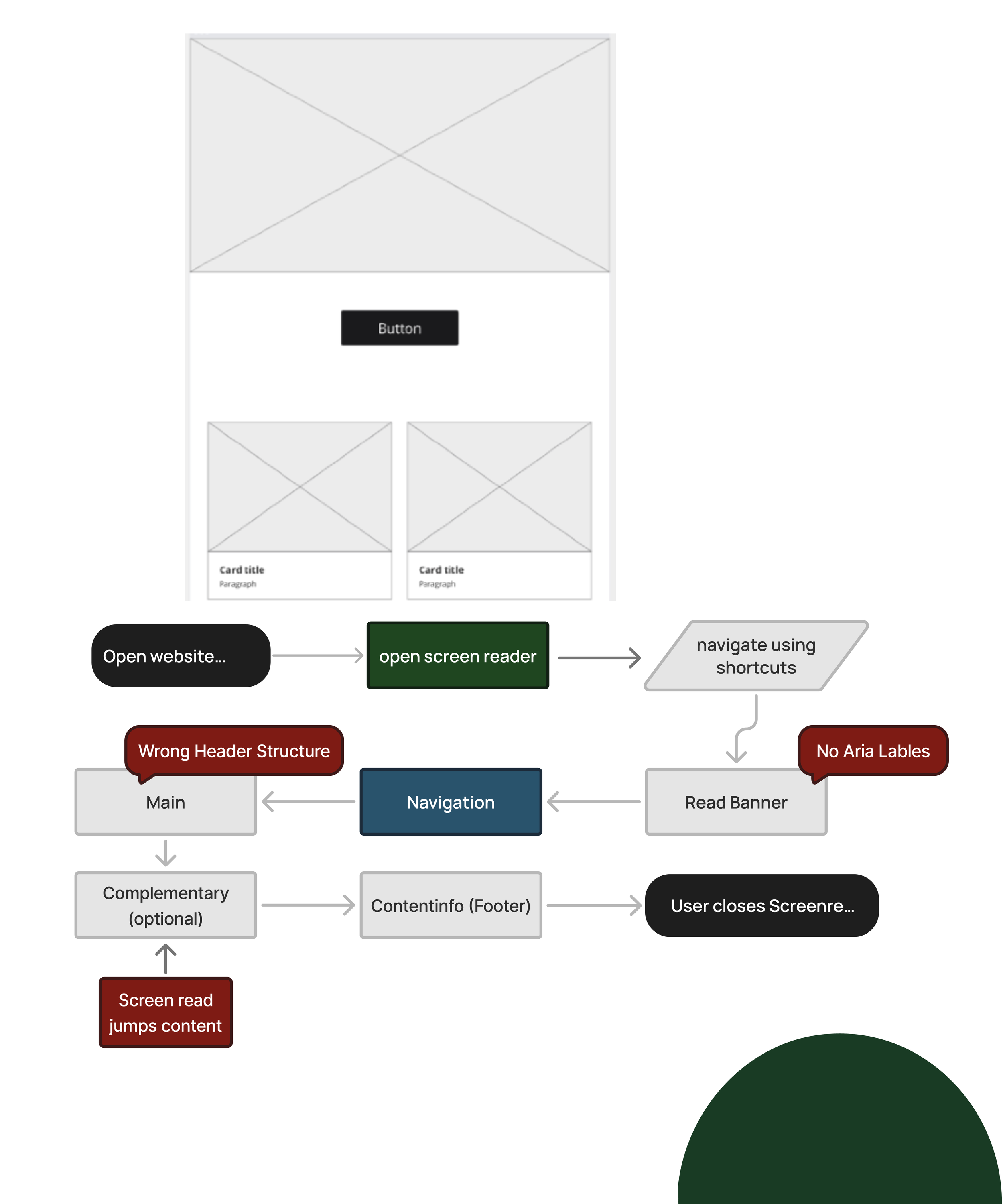
Many issues don’t show up in automated scans; they only appear through real interaction.
Screen Reader Testing
Real assistive tech. Real behaviour.
NVDA, VoiceOver, mobile
How content is actually experienced
Not just how it’s coded
Zoom & Resizing
Does it break under pressure?
Tested up to 400% zoom
Layout stability
Mobile + responsive behaviour
Keyboard Navigation
Can your site work without a mouse?
Menus, forms, interactions
Focus states + navigation flow
Full keyboard usability
Structure & Semantics
Is your content understandable?
Headings + hierarchy
Navigation clarity
Assistive tech compatibility
Colour & Contrast
Can users actually read it?
Text clarity
Button visibility
Low vision + colour blindness
Most accessibility issues aren’t technical — they’re usability problems.
They only show up when someone tries to use your site in the real world.
That’s what I test.
I’m an award-nominated Digital Accessibility Consultant with a background in graphic design (BA Hons).
My work is shaped by lived experience of disability — giving me a practical understanding of how digital barriers affect real users.
I help organisations identify and fix accessibility issues through audits, inclusive design, and real-world testing.
What I bring
WCAG 2.2 AA-aligned audits | Real assistive technology testing | Plain-English reporting (no jargon) | Design-led accessibility solutions | Lived experience insight applied to real systems
The Audit-First Approach
1
Ask
Assess
2
3
Advise.
4
Act
5
Assist.
My Accessible Approach
1
Accessibility Discovery call
Identify the most critical accessibility issues across your website, documents, and digital content
2
Clear Action Plan
Prioritised, WCAG 2.2–aligned fixes tailored to your platforms, users, and risks
3
Design & Fix
Improve usability, structure, and accessibility across interfaces, documents, and user journeys
4
Test with Real Assistive Tech
Screen reader (NVDA, VoiceOver), keyboard navigation, zoom/reflow, and real-world usability checks
5
Ongoing Support (Optional)
Accessibility guidance, design input, and compliance support as your product evolves
Clients who use my services



Start with an Accessibility Review
If you're unsure whether your learning materials or platforms are accessible, the best place to start is with an accessibility audit.
Get in touch to discuss how your organisation can create more inclusive learning experiences.